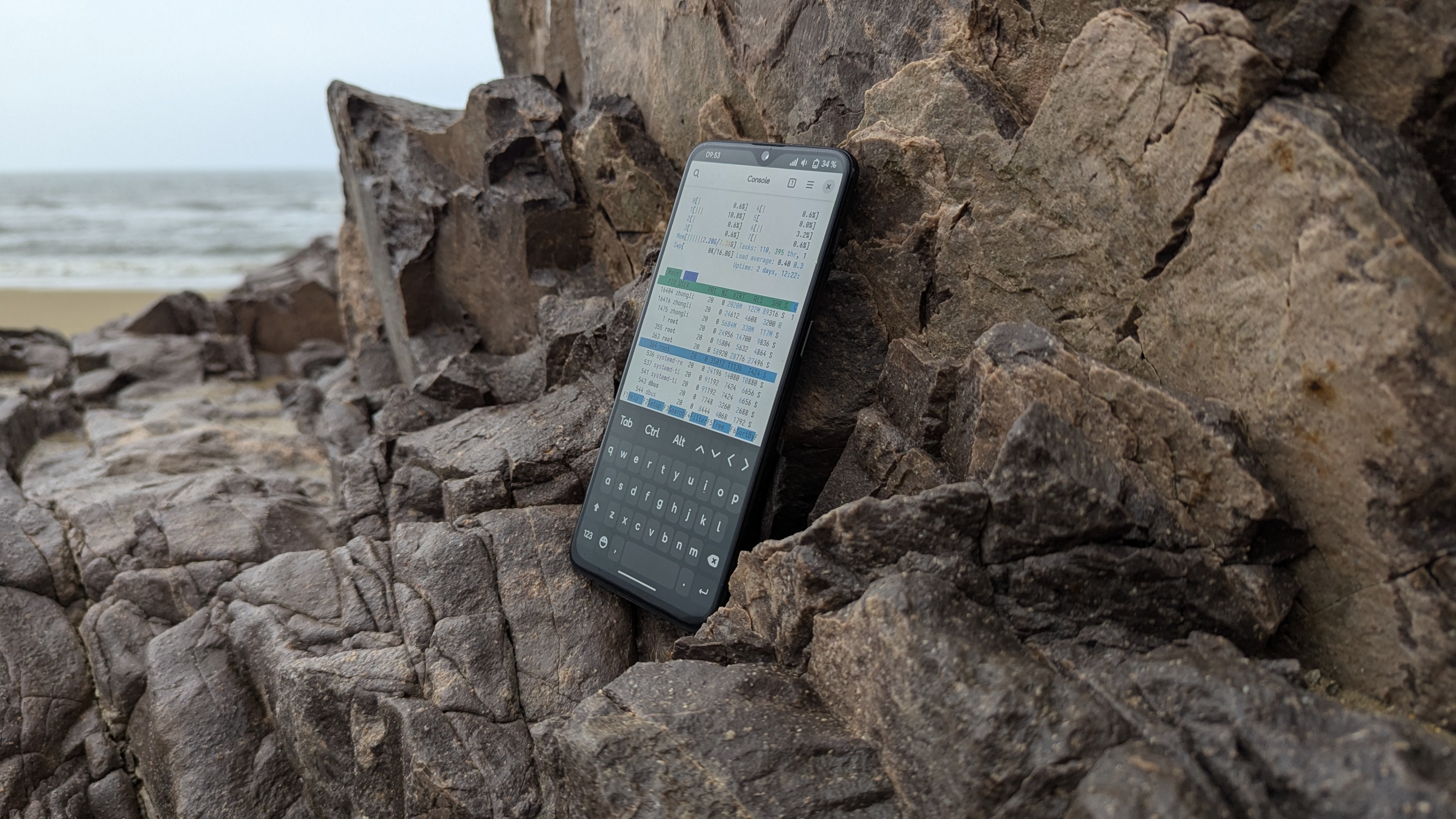


Radxa Q6A 單板機改裝 PostmarketOS,使用基於 musl 的發行版,節省記憶體,沒有受支援的 Android 手機,也可以體驗爲手機開發的 Linux 發行版。
Radxa Q6A 單板機紹介
請參閱 Q6A 單板機紹介了解更多關於單板電腦的硬體資訊。
Radxa Q6A 是採用高通 Dragonwing QCS6490(HLOS 名:Kodiak) ARM 晶片的單板機。相容 Arm V8 指令集,核心時脈2.7GHz。提供 GPIO,PCIe 等介面,用於連接多種外部裝置,可以滿足一般軟體/硬體開發者的開發,除錯需求。
板底還附有 MIPI CSI/DSI,UFS/eMMC 模組接口,用於安裝熒幕和UFS/eMMC 快閃記憶體。
PostmarketOS 的支援情況
Q6A 的 PostmarketOS 移植採用 upstream kernel,硬體支援較好。CPU,GPU,PCIe 等功能都已受到支援,Wi-Fi 和 Bluetooth 在自行編譯核心模組後也可以正常工作。不過軟體依然有些問題…
- 待機(Suspend)似乎有些問題,必須通過
ctrl+alt+F7組合鍵切換 TTY 控制臺才可以喚醒; - GNOME 桌面在 OpenRC init 程式下似乎有問題,嘗試登出使用者會遇到「GNOME Shell 失去回應」的提示,但是 GNOME 依然可以操作;
- 冷啓動單板機會導致 RTC 時鐘無法存取,
dmesg有ioctl相關錯誤。
準備刷機
在電腦上安裝 pmbootstrap,鍵入 pmbootstrap init 進行設定。Radxa Q6A 已經被 PostmarketOS 列爲「社群維護(community)」支援等級,因此官方的 pmaports 機型套件庫有收錄這臺裝置。
pmbootstrap init
[14:24:31] Location of the 'work' path. Multiple chroots (native, device arch, device rootfs) will be created in there.
[14:24:31] Work path [/home/kodiak/.local/var/pmbootstrap]:
[14:24:32] Location of the 'pmaports' path, containing package definitions.
[14:24:32] pmaports path [/home/kodiak/.local/var/pmbootstrap/cache_git/pmaports]:
[14:24:34] Choose the postmarketOS release channel.
[14:24:34] Available (14):
[14:24:34] * edge: Rolling release / Most devices / Occasional breakage: https://postmarketos.org/edge
[14:24:34] * v26.06: Latest release / Recommended for best stability
[14:24:34] * v25.12: Old release (supported until 2026-07-31)
[14:24:34] Channel [edge]:
[14:24:34] NOTE: pmaports is on main branch, copying git hooks.
[14:24:34] Choose your target device vendor (either an existing one, or a new one for porting).
[14:24:34] Available vendors (107): acer, alcatel, amazon, amediatech, amlogic, apple, ark, arrow, asus, ayaneo, ayn, bananapi, barnesnoble, beelink, blackberry, bq, clockworkpi, cubietech, cutiepi, dell, dongshanpi, epson, essential, fairphone, finepower, fly, fxtec, generic, goclever, google, gp, hisense, hp, htc, huawei, inet, infocus, jolla, khadas, klipad, kobo, lark, leeco, lenovo, lg, librecomputer, linksys, lynx, mangopi, medion, meizu, microsoft, mnt, mobvoi, motorola, nextbit, nobby, nokia, nothing, nvidia, odroid, oneplus, oppo, ouya, pine64, planet, pocketbook, postmarketos, powkiddy, purism, qcom, qemu, qualcomm, radxa, raspberry, realme, rockchip, samsung, semc, sharp, shift, sipeed, solidrun, sony, sourceparts, sqfmi, starway, surftab, t2m, thundercomm, tokio, tolino, trekstor, valve, vernee, vivo, volla, wd, wexler, wiko, wileyfox, xiaomi, xunlong, yu, zhihe, zte, zuk
[14:24:34] Vendor [qcom]:               # 裝置廠家選擇「qcom」
[14:24:36] Devices are categorised as follows, from best to worst:
* Main: ports where mostly everything works.
* Community: often mostly usable, but may lack important functionality.
* Testing: anything from "just boots in some sense" to almost fully functioning ports.
* Downstream: ports that use a downstream kernel — very limited functionality. Not recommended.

Available devices by codename (9): msm8226 (testing), msm8909 (testing), msm8916 (testing), msm8953 (community), msm8956 (testing), msm89x7 (testing), qcs6490 (community), rbx (testing), sm7150 (community)
[14:24:36] Device codename [qcs6490]:               # 鍵入「qcs6490」,使用爲 Dragonwing QCS6490 晶片建立的通用 port
[14:24:37] Username [kodiak]:                       # 鍵入自己的使用者名稱,例如 yupik
[14:24:40] Available providers for postmarketos-base-ui-audio-backend (2):
[14:24:40] * pulseaudio: Use pulseaudio as the audio backend. (default)
[14:24:40] * pipewire: Use pipewire as the audio backend. (but may not work with all devices)
[14:24:40] Provider [pulseaudio]:                       # 選擇系統採用的音訊伺服器,沒什麼使用音效增益軟體的需求就選 pulseaudio
[14:24:41] Available providers for postmarketos-base-ui-wifi (2):
[14:24:41] * wpa_supplicant: Use wpa_supplicant as the WiFi backend. (default)
[14:24:41] * iwd: Use iwd as the WiFi backend (but may not work with all devices)
[14:24:41] Provider [default]:
[14:24:42] Available providers for postmarketos-usb-moded-default-profile (2):
[14:24:42] * developer: Make 'developer mode' the default usb-moded profile (always enables usb networking) (default)
[14:24:42] * charging: Make 'charging mode' the default usb-moded profile (usb networking must be manually enabled)
[14:24:42] Provider [developer]:
[14:24:43] Available user interfaces (30):
[14:24:43] * none: Bare minimum OS image for testing and manual customization. The "console" UI should be selected if a graphical UI is not desired.
[14:24:43] * buffyboard: Plain framebuffer console with modern touchscreen keyboard support
[14:24:43] * cage: (Wayland) Kiosk WM
[14:24:43] * console: Console environment, with no graphical/touch UI
[14:24:43] * cosmic: COSMIC Desktop Environment from System76
[14:24:43] * fbkeyboard: Plain framebuffer console with touchscreen keyboard support
[14:24:43] * gnome: (Wayland) Gnome Shell
[14:24:43] * gnome-mobile: (Wayland) Gnome Shell patched to adapt better to phones (Experimental)
[14:24:43] * i3wm: (X11) Tiling WM (keyboard required)
[14:24:43] * kodi: (GBM) 10-foot UI useful on TV's
[14:24:43] * lomiri: (Wayland) The convergent desktop environment (Experimental)
[14:24:43] * lxqt: (X11) Lightweight Qt Desktop Environment (stylus recommended)
[14:24:43] * mate: (X11) MATE Desktop Environment, fork of GNOME2 (stylus recommended)
[14:24:43] * moonlight: (Wayland) Open Source PC client for NVIDIA GameStream, as used by the NVIDIA Shield
[14:24:43] * niri: (Wayland) A scrollable-tiling compositor (DOES NOT RUN WITHOUT HW ACCELERATION!)
[14:24:43] * openbox: (X11) A highly configurable and lightweight X11 window manager (keyboard required)
[14:24:43] * os-installer: UI for installing postmarketOS
[14:24:43] * phosh: (Wayland) Mobile UI using GNOME components and apps
[14:24:43] * plasma-bigscreen: (Wayland) 10-feet variant of Plasma, made for big screen TVs
[14:24:43] * plasma-desktop: (Wayland) KDE Desktop Environment (works well with tablets)
[14:24:43] * plasma-mobile: (Wayland) Mobile variant of KDE Plasma
[14:24:43] * retroarch: RetroArch in KMS mode
[14:24:43] * shelli: Plain console with touchscreen gesture support
[14:24:43] * sway: (Wayland) Tiling WM, drop-in replacement for i3wm
[14:24:43] * sxmo-de-dwm: Simple Mobile: Mobile environment based on SXMO and running on dwm
[14:24:43] * sxmo-de-i3: Simple Mobile: Mobile environment based on SXMO and running on i3
[14:24:43] * sxmo-de-river: Simple Mobile: Mobile environment based on SXMO and running on river
[14:24:43] * sxmo-de-sway: Simple Mobile: Mobile environment based on SXMO and running on sway
[14:24:43] * weston: (Wayland) Reference compositor (demo, not a phone interface)
[14:24:43] * windowmaker: (X11) Window manager inspired by the NeXTSTEP user interface (stylus recommended)
[14:24:43] * xfce4: (X11) Lightweight desktop (stylus recommended)
[14:24:43] User interface [gnome]:  # 依用途選擇桌面環境或者使用者介面
[14:24:45] Based on your UI selection, 'default' will result in installing systemd.
[14:24:45] Install systemd? (default/always/never) [never]:  # 是否使用 systemd?鍵入「never」來改用 Alpine 採用的 OpenRC init 程式
[14:24:46] Additional options: extra free space: 0 MB, boot partition size: 512 MB, parallel jobs: 8, ccache per arch: 5G, sudo timer: False, mirror: http://mirror.postmarketos.org/postmarketos/
[14:24:46] Change them? (y/n) [n]:
[14:24:46] Additional packages that will be installed to rootfs. Specify them in a comma separated list (e.g.: vim,file) or "none"
[14:24:46] Extra packages [nano]:
[14:24:47] Your host timezone: Australia/Perth
[14:24:47] Use this timezone instead of GMT? (y/n) [y]: # 設定時區,語言...
[14:24:47] Choose your preferred locale, like e.g. en_US. Only UTF-8 is supported, it gets appended automatically. Use tab-completion if needed.
[14:24:47] Locale [en_US]:
[14:24:48] Device hostname (short form, e.g. 'foo') [qcom-qcs6490]:
[14:24:48] SSH public keys found (1):
[14:24:48] * /home/kodiak/.ssh/id_ed25519.pub
[14:24:48] See https://postmarketos.org/ssh-key-glob for more information.
[14:24:48] Would you like to copy these public keys to the device? (y/n) [n]:
[14:24:49] After pmaports are changed, the binary packages may be outdated. If you want to install postmarketOS without changes, reply 'n' for a faster installation.
[14:24:49] Build outdated packages during 'pmbootstrap install'? (y/n) [n]:
[14:24:49] Zap existing chroots to apply configuration? (y/n) [y]:
[sudo] password for kodiak:
[14:24:56] DONE!
設定完成後,鍵入 pmbootstrap install --sdcard= 命令語將 PostmarketOS 安裝到 SD 卡,或者是 NVME SSD 之類的裝置上。安裝完成後,將 SD 卡(或者是快閃記憶體模組)插到單板機上,按下開機按鈕,將 boot order 改爲從 SD 卡開機,等到熒幕出現 gdm 的畫面後,鍵入自己設定的密碼登入系統。
除了內建的 WiFi 網路卡不可用(沒有驅動程式),其他功能都可以使用了。
修復 Wi-Fi 網路卡
Q6A 單板機內建採用 USB 2.0 協定的 Quectel FCU760K(又是妳啊…還是一如既往的難以使用,對吧?) Wi-Fi 網路卡,使用 AICSemi AIC8800 晶片。目前裝置相關的驅動程式沒有進入 upstream kernel,需要使用 out-of-tree 的 aic8800 核心模組。
編譯自訂核心
雖然 Alpine Linux 採用自己的 AKMS(Alpine Kernel Module Support),同樣可以像 DKMS 那樣編譯 out-of-tree 核心模組到核心中,隨着核心升級而升級。但我並不會編寫自己的 AKMS 編譯指令搞,只能手動編譯核心模組,再 insmod 到自己的自訂核心中了。
執行 git clone https://github.com/radxa-pkg/aic8800.git 命令語下載 Radxa 提供的 aic8800 模組原始碼,再去 kernel.org 上下載一份主線核心的原始碼 tar 壓縮檔,解壓縮檔案就可以開始編譯核心了。
# 下載核心原始碼
wget https://cdn.kernel.org/pub/linux/kernel/v7.x/linux-7.1.5.tar.xz
tar -Jxf linux-7.1.5.tar.xz

# 安裝編譯用套件 & 編譯核心

sudo apk add build-base openssl-dev libelf-dev bison flex perl linux-headers ncurses-dev tar xz cpio bash
cd linux-7.1.5
make nconfig    # 或者 make xconfig (需要安裝QT6套件)
make -j8 Image.gz
如果不想通過 make nconfig 來手動建立配置檔,可以從單板機上正在運行的作業系統複製其核心 .config 配置檔,例如 Armbian 或者 Fedora。
之後通過 make nconfig 命令語儲存就可以了。在 Q6A 單板機編譯核心需要大約36分鐘(12GB記憶體)就可以完成。
安裝自訂核心及核心模組。PostmarketOS 默認需要自己處理 initramfs 和開機程式的修改。雖然安裝了核心之後需要藉助 mkinitfs 重新產生一份 initramfs 給自訂核心,但似乎直接拿自帶 7.1.2 核心的 initramfs 也可以?
之後,用 nano 或者其他方法,新增一份 systemd-boot 開機載入程式的配置檔,告訴 systemd-boot 採用自訂核心開機(其中 option 可以從 /proc/cmdline 中複製當前核心的引數修改):
# /boot/loader/entries/pmos-custom.conf

title PostmarketOS
sort-key PostmarketOS
linux vmlinuz
initrd initramfs
options loglevel=5 rw console=tty0 ...
修改 /boot/loader/loader.conf 檔案,新增 timeout console-mode 引數:
# /boot/loader/loader.conf

timeout 3
console-mode keep
編譯驅動原始碼
首先執行 lsusb,應該會看到 VID 和 PID 爲 a69c:8d80 的裝置,根據原始碼中提供的廠家文檔來看,應該是 AIC8800D80 晶片(下方命令語爲範例):
# lsusb
Bus 001 Device 001: ID 1d6b:0002 Linux Foundation 2.0 root hub
Bus 001 Device 002: ID 1a40:0101 Terminus Technology Inc. Hub
Bus 001 Device 003: ID 1a40:0101 Terminus Technology Inc. Hub
Bus 001 Device 005: ID 248a:60ab Maxxter AiMouse
Bus 001 Device 006: ID 2717:5015 Xiaomi Inc. Xiaomi Wired Mechanical Keyboard      # 嗯...這些是我自願放棄的隱私
Bus 001 Device 007: ID a69c:8d81 AICSemi AIC 8800D80    # 裝載韌體並正常工作的 AIC8800 網路卡
Bus 002 Device 001: ID 1d6b:0002 Linux Foundation 2.0 root hub
Bus 002 Device 002: ID 05e3:0610 Genesys Logic, Inc. Hub
Bus 003 Device 001: ID 1d6b:0003 Linux Foundation 3.0 root hub
Bus 003 Device 002: ID 05e3:0626 Genesys Logic, Inc. Hub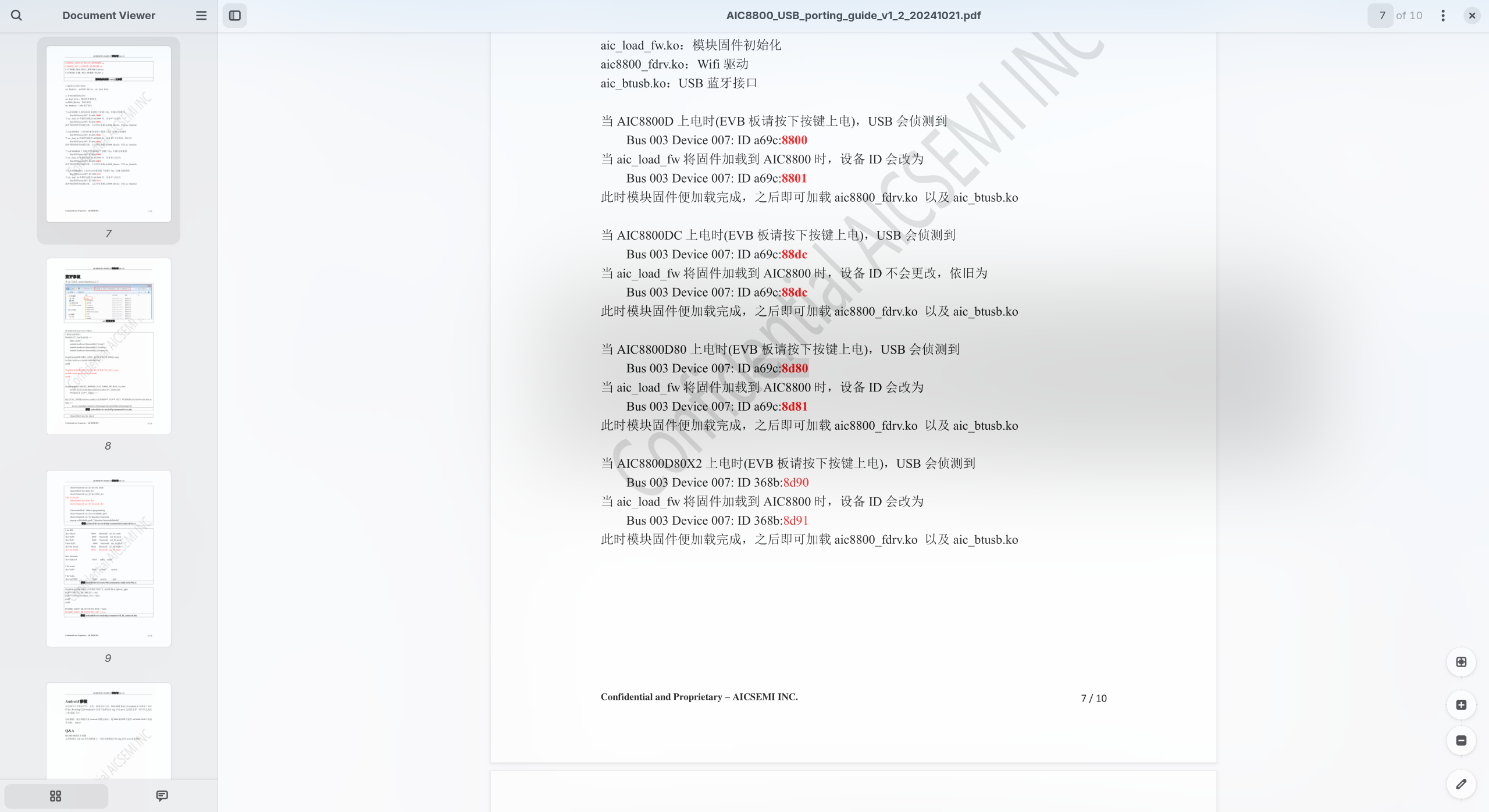
因爲 Linux 7.1 cfg80211 有幾處 API 變更,直接編譯驅動程式會遇到錯誤不給編譯,需要自己 patch aic8800 驅動原始碼才可以補正問題。
cd ~/aic8800
$ wget https://raw.githubusercontent.com/gahingwoo/kiln/main/aic8800-patches/0001-aic8800-cfg80211-7.1-net_device-to-wireless_dev.patch
$ patch -p1 < 0001-aic8800-cfg80211-7.1-net_device-to-wireless_dev.patch
補正之後,到原始碼找到 USB 資料夾,然後開終端機,編譯並安裝 aic8800 aic_btusb 核心模組:
$ cd ~/aic8800/src/USB/driver_fw/drivers/aic8800
$ make -C /lib/modules/$(uname -r)/build M=$PWD modules
$ make -C /lib/modules/$(uname -r)/build M=$PWD modules_install

$ cd ~/aic8800/src/USB/driver_fw/drivers/aic_btusb
$ make -C /lib/modules/$(uname -r)/build M=$PWD modules
$ make -C /lib/modules/$(uname -r)/build M=$PWD modules_install
安裝完成後,重開機,或者使用 depmod -a 命令套用核心模組變更。
之後,鍵入 modprobe aic_load_fw aic8800_fdrv 命令加載核心模組。如果發現網路卡依然不工作,檢視 dmesg 發現 aic_btusb 模組噴出 failed to open 錯誤:
[ 9.051106] aic_load_fw: loading out-of-tree module taints kernel.
[ 9.054417] aic_bluetooth_mod_init
[ 9.054424] AICWFDBG(LOGINFO) aicwf_prealloc_init enter
[ 9.057687] AICWFDBG(LOGINFO) aicwf_usb_probe vid:0xA69C pid:0x8D80 icl:0x0 isc:0x0 ipr:0x0
[ 9.057692] AICWFDBG(LOGINFO) aicloadfw_chipmatch USE AIC8800D80
[ 9.061080] aic_load_firmware :firmware path = /lib/firmware/aic8800D80/fw_patch_table_8800d80_u02.bin
[ 9.061176] aic_load_firmware: fw_patch_table_8800d80_u02.bin file failed to open
[ 9.061220] aicbt_patch_table_alloc fail
[ 9.061230] aicwf_bus_deinit
[ 9.561648] usb_err:<aicwf_usb_rx_submit_all_urb,234>: bus is not up=0
把原始碼中提供的韌體(在 src/USB/driver_fw/fw 目錄)檔案,按照 dmesg 中的訊息,複製到 /lib/firmware 下,重開機就可以了。
複製韌體並重載核心模組後,GNOME 的 Quick setting 面板就會出現「Wi-Fi」選單,執行 lsusb 後,裝置的 PID 變成 8d81,網路卡可以正常使用了。
後記
使用 GNOME 的 PostmarketOS,在不安裝擴充程式的情況下,使用 htop 程式檢視裝置 RAM 利用率,只有 1.5GB ~ 2GB!很棒。或許之後應該把 aic8800 驅動做成 AKMS,隨着核心更新而更新,也就不用每次都要手動編譯了。